If you run Microsoft Dynamics and someone has mentioned Jet Reports, you have probably been given one of two unhelpful answers: "it's a reporting tool" or a product sheet full of terms that assume you already know. Here is the plain version.
Jet Reports is an Excel add-in that pulls live data out of your Dynamics ERP — Business Central, NAV or GP — so your finance team can build reports in the tool they already know. It is developed by insightsoftware, which acquired the original Jet Global product. The important idea is that the report is defined once and then refreshed, rather than exported and rebuilt every month.
What it looks like
Once installed, Jet appears as its own tab on the Excel ribbon:

How it actually works
Instead of exporting a static spreadsheet, you build the report using a small number of Jet functions, written into cells like any other Excel formula:
- NL() — the "no layout" function. It retrieves records and field values from any table in your ERP. This is the workhorse: customers, items, ledger entries, anything.
- GL() — pulls general-ledger balances for a given account, period and dimension. This is what builds a P&L or balance sheet that actually ties back.
- The Report Wizard and Table Builder assemble these for you, so nobody has to memorise the syntax to get started.
When you press Run, Jet queries the ERP and drops live figures into your layout. Here is a balance sheet doing exactly that — same workbook, same formatting, current numbers:
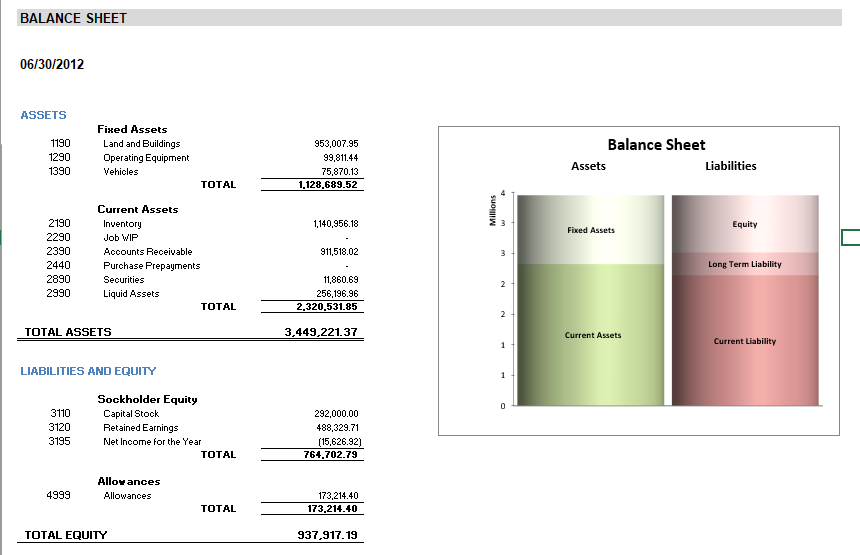
The refresh itself is the point. This one took three seconds:

Jet Reports vs Jet Analytics — the confusion worth clearing up
These are two different products, and conflating them causes genuinely expensive mistakes — usually buying the heavier one when the lighter one would have done.
| Question | Jet Reports | Jet Analytics |
|---|---|---|
| Where does it live? | Inside Excel | A data warehouse layer underneath |
| What does it read? | Live ERP data, directly | Governed warehouse + OLAP cubes |
| Who is it for? | Finance, in spreadsheets | The whole business, incl. BI tools |
| Typical output | P&L, aged debt, month-end pack | Dashboards, cross-source analytics |
Rule of thumb: if you want financial statements and detailed operational reports in Excel, that is Jet Reports. If you want a governed warehouse feeding dashboards across several systems, that is Jet Analytics. Plenty of businesses genuinely need only the first, and are quoted for the second.
Who it's actually for
Jet Reports suits finance and operations teams on Dynamics who live in Excel and need repeatable, drillable reports — month-end packs, management accounts, aged debt, inventory — without rebuilding them each cycle.
It is a weaker fit if your primary need is visual dashboards for a non-finance audience, or analytics blending Dynamics with several unrelated systems. That is Power BI territory, and we cover the honest comparison in our Jet Reports vs Power BI guide.
What good looks like
In a healthy Jet setup you should be able to say yes to most of these:
- The month-end pack refreshes rather than being rebuilt
- Figures reconcile to the ERP without manual adjustment
- You can drill from a summary number to the transactions behind it
- More than one person knows how the reports are built
- New reports are a day's work, not a project
If you own Jet and can't say yes to most of that, the problem is almost always configuration rather than the software. That is the single most common thing we are called in to fix.
Frequently asked
Do I need Jet Analytics to use Jet Reports?
Does Jet Reports work with Business Central online?
Do I need to know SQL?
Will it slow down our ERP?
We're independent Jet Reports specialists. A free review tells you what's fixable.
Book a free reporting review